

Suppose you have written an excellent article—putting in the research and hard work—but it simply isn’t ranking on Google. The real issue is not content it self but actually on page SEO.
On page SEO is a important step that must be performed on every page before publishing. When done properly, it helps Google understand your content if done incorrectly, even the best content gets left behind.
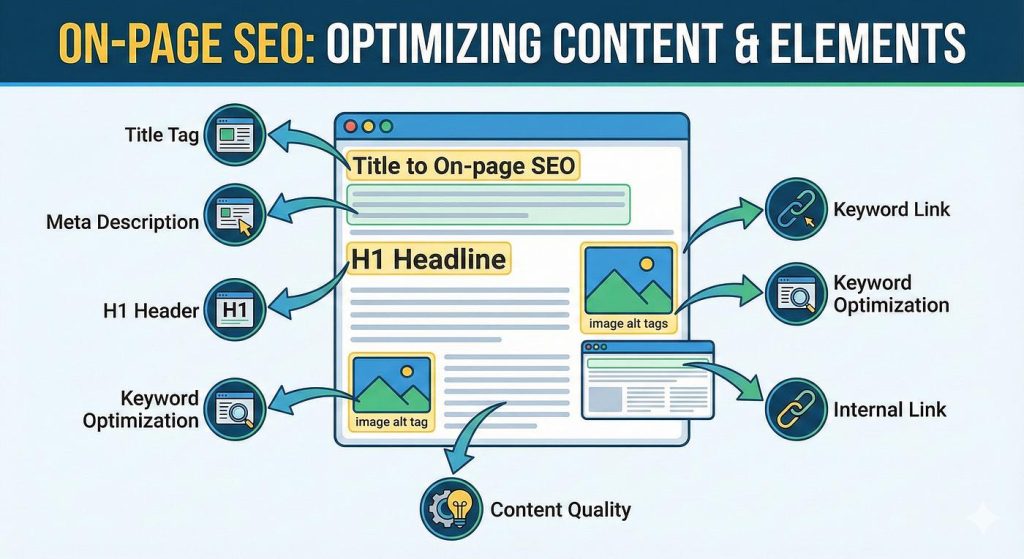
this guide will show you the fundament of practical on-page SEO optimization—covering everything clearly from title tags, image and alt text.
What is On Page SEO
On page SEO means optimize the elements and webpage such as content, headings, images and links so that Google can easily read and understand the topic in the page.
like off-page SEO, technical SEO and on-page SEO is completely your control. You can implement it right now, without any external help.
Just remember a easy formula:
Good On-Page SEO = informing google about the page topic + Providing the value for audience
Both must happen simultaneously. Robotic content written solely for Google doesn’t work, while content written exclusively for the reader often fails to reach Google effectively.
Key Elements of on page SEO
On-page SEO involves several components—let’s understand them one by one.
1. Title Tag — First and Most Important Element
The title tag is the text show as a blue link in Google search results. It quick grabs the attention of audience and Google.
Good title tag rules:
Length: Keep 50–60 characters if it is too long, Google will just truncate it.
first Focus keyword: Try to put the right keyword at the starting of the title
Make it attractive: Simple keyword is not enough that grabs peoples attention.
Add year: Words like 2024 or Complete Guide help boost the CTR
Incorrect title: On Page SEO
Correct title: On Page SEO Complete Guide Optimize Title, Meta description and Content
The second title is more informative, clear keyword and audience understands exactly.
2. Meta Description — The Ultimate Weapon for CTR
A meta description consists of the 2 to 3 lines that appear below the title in Google search results. While it is not technically a direct ranking factor, it significantly impacts the CTR more people click, stronger the signal valuable page by Google receives.
Rules for meta descriptions:
- Length: 150 to 160 characters if it over this limit Google will truncate.
- Include the focus keyword naturally — Google bolds it in the search results
- Use action oriented language — words like Learn, Discover or Read
- Create a unique meta description for every page — avoid copy pasting
Example:
What is on page SEO and how do you implement. A complete guide to optimizing title tags, meta descriptions, headings and content.
3. URL Structure — Clean and Rich Keyword
The clear URL for Google and reader.
URL rules:
- Keep it short: 3 to 5 words is ideal.
- Include the focus keyword: /on-page-seo-complete-guide [correct]
- Use hyphens, not underscores: on-page-seo [correct] | on_page_seo [Incorrect]
- Avoid numbers and dates: /2024/06/on-page-seo [Incorrect] — it looks outdated later on.
- Always use lowercase: Do not use capital letters in the URL.
Incorrect URL: neuroagent.in/?p=127
Correct URL: neuroagent.in/on-page-seo-complete-guide
4. Heading Tags —
Heading tags provide structure to content. By reading them, Google understands what is important on the page and identifies the sub topics.
H1 — Use Only Once: The H1 is your main title. There should be only one per page and it should include the focus keyword.
H2 — Major Sections: Start every main section with an H2 tag. You can naturally include secondary keywords or related phrases here.
H3 — Sub Points: Use H3 tags for sub points within H2 section. H4 and H5 tags are generally not needed if you do find a need for them, your content might have become overly complex.
Common Mistake: People use headings simply to make text bold this is incorrect. Headings and bold formatting serve different purposes.
5. Content Optimization — Quality First, Keywords Second
Content is king. Google algorithm has become smart enough to understand context, not just keywords.
To optimize content:
Place the focus keyword within the first 100 words — Use it naturally in the introduction. Google gives more weight to the opening paragraph.
Maintain a keyword density of 1%–2% — In a 1,000-word article, the primary keyword shouldn’t appear more than 10–15 times. Exceeding this limit is considered keyword stuffing, which can lead to Google penalties.
Use LSI keywords — Synonyms and related terms for your primary keyword should appear naturally in the content. For instance, terms like title optimization, meta tags and content structure should accompany on page SEO. This demonstrates the depth of the topic to Google.
Write short paragraphs — Keep paragraphs 2 to 4 lines. Large blocks of text are difficult to read on mobile devices and can this cause audience to bounce.
Use bullet points and tables — A structured format is more effective.
6. Image Optimization — Both Speed and Alt Text Are Important
Images make content attractive, but if not optimized correctly, they can slow down the site which is a major ranking factor.
Rules for image optimization:
Use descriptive file names: img001.jpg [correct] on-page-seo-title-tag-optimization.webp [Incorrect]
Always include Alt text: Alt text Because Google cannot see images, it can only read them. You can naturally include a keyword here, but only as part of the description.
Incorrect Alt tex: on page seo optimization guide
Correct Alt text: On page SEO title tag optimization
Use the WebP format: WebP files are 25–30% smaller than JPEGs, leading to faster site loading.
Compress images: Use image Compress tool Squoosh.app (free). An image should be under 100KB.
7. Internal Linking — Show Google Your Entire Site
Internal linking means including links to your other articles within your current article. It serves two purposes it provides audience related content and helps Google understand which topics on your site are interconnected.
Rules for internal linking:
- Include at least 3 internal links in every article
- Use descriptive anchor text: click here [Incorrect] → Keyword Research Guide [correct]
- Link to related content — avoid linking to irrelevant pages
- Link every cluster article to the pillar page and link every cluster article back to the pillar page
8. External Links — on page SEO
Some people believe that linking to other websites means losing their own traffic this is a misunderstanding Linking to authoritative sources signals to Google your content is well researched.
- Wikipedia, government sites and research papers help build trust.
- External links should open in a new tab
- Do not link to spam or low quality sites.
FAQ:
What is the difference on-page SEO and off-page SEO? On page SEO covers everything you control within the page itself such as the title, content and images. Off page SEO comes from external sources like backlinks and social signals. Both are important but you should start with on page SEO.
How many focus keywords should a page have? Stick to just one primary focus keyword. Secondary keywords and LSI keywords play a supporting role. Using more than one primary keyword carries the risk of keyword cannibalization.
Does meta description directly affect rankings? Not directly but a meta description boosts CTR. More clicks signal to Google that your page is valuable, which indirectly improves rankings.
What should the image size be? Less than 100KB ideally between 50KB and 80KB. Use a size of 1200×628px for the featured image. For images within the content, a width of 800px is sufficient.
Conclusion — Apply It to Every Article
On page SEO is not a one time task it is a habit that must be practiced every time you write an article.
With the right title tag, meta description, a clean URL, natural content, and optimized images when all these elements come together correctly Google will confidently rank your page.
The best part is that on page SEO optimization does not require a huge investment just the free Rank Math plugin and a little planning are enough.
