

Keyword research is the foundation of any SEO strategy. If you do not choose right keywords, ranking on Google becomes difficult, no matter how good your content is.
In this guide, you will learn how to collect keyword research step by step, using free tools, and without spending any money. Whether you are a new blogger or looking to grow your business website, this is process for you.
What is keyword research?
Keyword research is a process where you find out what people are searching for on Google—so that you can create the content they actually want.
Guesswork isn’t enough; you need data. Keyword research provides exactly that data.

- Frequently searched for by many people (search volume)
- Cheating shouldn’t be difficult (so, medium difficulty).
- It should be relevant to your topic.
- It should solve the reader’s actual problem.
A simple example: Someone searching for “What is SEO” is a beginner looking to learn. Someone searching for “best free SEO tool for beginners” is already ready to buy or use something—these are keywords with different intents.
Why is important keyword research?
Bahut se beginners seedha content likhna shuru kar dete hain — bina yeh jaane ki koi us topic ko search bhi karta hai ya nahi.
Keyword research reveals:
- Exact search terms — what people type and in which language
- Search volume — how many people search for this per month.
- Keyword Difficulty (KD) — How much competition there is to rank
- Search intent — whether they simply want to know something or want to buy something..
- Content gaps — topics that competitors have missed.
An article written without keyword research is like shooting arrows in a dark room—it requires luck, not strategy.
Step by Step Keyword Research Process
Now, let’s understand practically how keyword research is done—step by step.
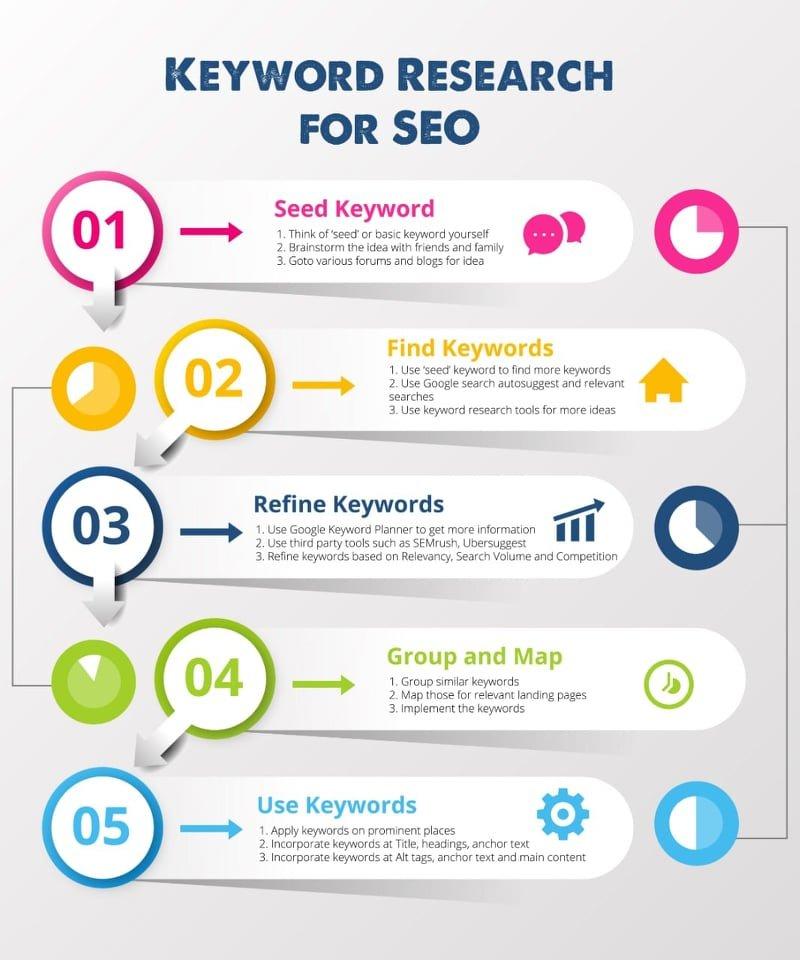
Step 1 — Write Seed Keywords (Brainstorming)
Keyword research begins with “seed keywords”—these are the basic words directly related to your topic.
How to do it: Take a sheet of paper or notepad, think about your topic and write down the basic words. For instance if you are writing about SEO
- seo
- keyword research
- on page seo
- backlinks
- google ranking
Don’t search for these right now; just create a raw list. This is your starting point.
Pro Tip: Ask yourself—”If I were a new user, what would I type into Google?” That is your seed keyword.
Step 2 — Use Google Suggest and People Also Ask (Free!)
This is the easiest and completely free method.
Google Suggest: Type your seed keyword into the Google search bar and add a space—Google automatically provides suggestions. These are actual user searches.
Example: On typing “keyword research” Google will suggest:
- how to do keyword research
- keyword research tools free
- keyword research for beginners
- keyword research in hindi
People Also Ask: When you search for any keyword, a “People Also Ask” box appears on the page. This box provides a list of questions that real people have searched for—it is a goldmine for long-tail keywords.
Google Related Searches: There is a “Related Searches” section at the very bottom of the page—this also provides free keyword ideas.
Step 3 — Use Free Keyword Research Tools
After identifying seed keywords, extract data using these free tools:
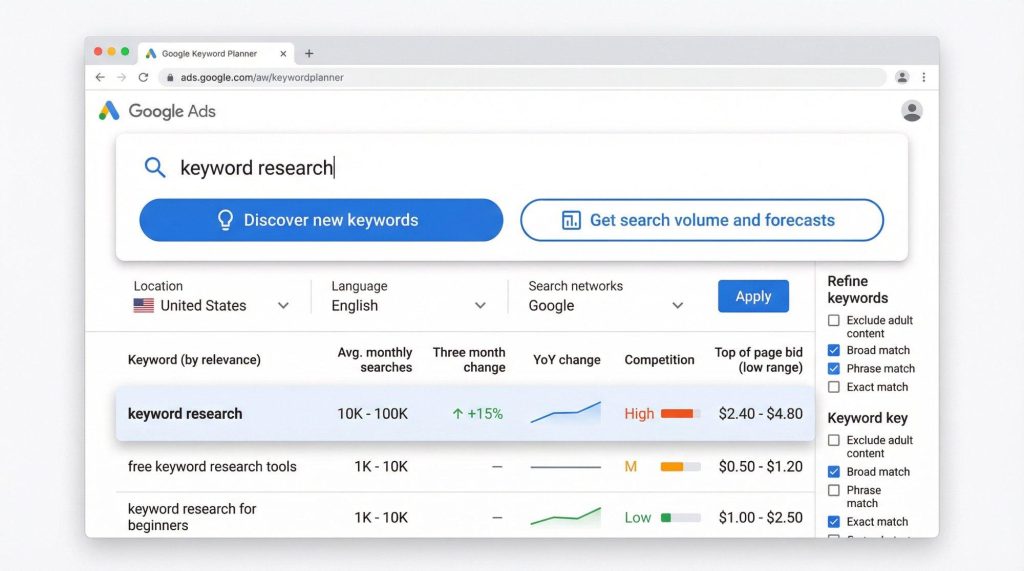
1. Google Keyword Planner (Best Free Tool)
You can accesst for free via a Google Ads account.
The Tool shows the exact monthly search volume.
It also indicates the competition level (Low / Medium / High).
How to use it: ads.google.com → Tools →Google Keyword Planner → “Discover new keywords”
2. Ubersuggest (Neil Patel)
Offers 3 free searches per day
Displays search volume, SEO difficulty, and CPC
Suggests competitor keywords as well – Ubersuggest
3. Google Search Console (Keywords You Already Rank For)
If your site is already live, this tool shows the keywords for which you are already ranking.
4. Answer The Public
Best for finding question-based keywords.
Provides keywords like “Who, What, Why, How, When, and Where.”
Useful for ranking in featured snippets.
5. Keyword Surfer (Chrome Extension)
Displays search volume directly within Google search results.
Simply install it and perform a standard search—the data appears automatically.
Step 4 — Check Search Volume and Keyword Difficulty
You need to look at two things for each keyword:
Search Volume : This indicates how many people search for this keyword in a month.
Keyword Difficulty : It is measured on a scale of 0 to 100. The higher number greater competition.
Step 5 — Understand Search Intent
Finding a keyword not enough you need to understand what the user wants from that keyword. This is known as search intent.
4 Types of Search Intent:
Informational — Just wants to know something
Example: “what is keyword research”
Content type: Beginner’s guide, explanatory article
Navigational — Wants to visit a specific site
Example: “ubersuggest login”
Content type: Direct page — difficult to rank an article for this
Commercial — Comparing options or conducting research
Example: “best keyword research tools 2024”
Content type: Comparison article, listicle
Transactional — Ready to buy or sign up
Example: ahrefs buy subscription
Content type: Product and sales page
Practical tip: Search for your keyword on Google and look at the top 5 results. Blog post, video or product page Create your content in that same format.
Step 6 — Choose Long Tail Keywords
Long tail keywords are those consisting of three or more words. They are ideal for beginners because:
- Competition is very low
- The searcher’s intent is clear
- Conversion rates are higher
Always start with long-tail keywords for a new blog. The traffic might be lower, but the chances of ranking will be much higher.
Step 7 – Analyze Competitor Keywords
Check keywords your competitors are ranking . This is a shortcut they already done the research, so can use the results.
Free method:
- Enter the competitor’s URL into Ubersuggest
- Check the “Top Pages” section
- Identify pages with a high number of backlinks—those keywords are valuable
- Create better, longer, and more detailed content on the same topic
This is known as the Skyscraper Technique—creating something better than your competitor’s content.
Step 8 — Create and Group the Final Keyword List
By now, you likely have a large number of keywords. Organize them as follows:
- Primary Keyword — The main keyword that the entire article will focus on
- Secondary Keywords — 3 to 5 related keywords that appear naturally within the content
- LSI Keywords — Synonyms and phrases related topic
Use only one primary keyword per article otherwise, keyword cannibalization will occur and two of your own pages will compete against each other.
Common Keyword Research Mistakes
Beginners often make these mistakes—avoid them:
- Starting with high-competition keywords — Ranking for broad keywords like “SEO” or “digital marketing” is almost impossible for a new blog.
- Ignoring search intent — If someone searches for “buy SEO tool” and you provide an informational article, they will bounce.
- Focusing only on search volume — A keyword with a search volume of 10,000 is useless if the Keyword Difficulty is 80.
- Using multiple primary keywords in one article — One article, one primary keyword. That’s the rule.
- Doing keyword research once and forgetting about it — Trends change Revisit every 3 to 4 months.
FAQ:
What is the best free tool for keyword research? Google Keyword Planner is the most reliable option for beginners because the data comes directly from Google. Ubersuggest and Answer the Public are also good free options.
How many keywords should be used in an article? One primary keyword 3 to 5 secondary keywords and LSI keywords. Keep the primary keyword density between 1% and 2%; anything higher is considered keyword stuffing.
Can keyword research be done in Hindi? Yes, simply set the language filter in Google Keyword Planner. The search volume for Hindi keywords is generally lower than for English but competition is also much lower making it beneficial for new blogs.
Long tail or short tail which is better for beginners? Long tail keywords are always better for starting out. They rank more easily and drive targeted traffic.
Conclusion — Start Right with Keyword Research
Keyword research is the most important in SEO those who master it always stay ahead of the competition.
Remember this entire process: Seed keywords, Google Suggest, Free tools, Check volume and difficulty, Understand intent , Select long tail keywords, Analyze competitors, Organize your list.
Once this process becomes a habit every article you create will be Google ready before you even write a single word.
Be sure to read these guides for the next steps:
Best Free SEO Tools List
